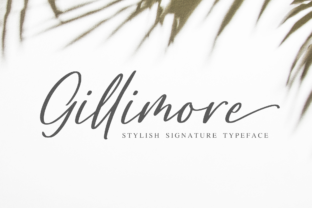
Gillimore: The Elegant Handwritten Font for Versatile Creativity
The moment you see Gillimore, you understand its appeal. Each letter flows with a sense of practiced grace, and those gorgeous swashes and ligatures whisper of bespoke invitations and artisan branding. It stands out immediately as a stylish handwritten font. Yet, the true power of Gillimore isn't just in its beauty—it's in its incredible versatility. Whether you're a blogger crafting a signature header, a small business owner designing product labels, or a hobbyist creating a personal journal, Gillimore promises to elevate your work. However, to truly turn your creative ideas into a true piece of art, you need to approach it with a bit of strategic know-how. Missteps in choosing, applying, or understanding such a distinctive font can subtly undermine your project's impact.
Overestimating "Installing" Versus Understanding "Applying"
A common and costly misunderstanding is treating Gillimore like any other standard system font. You download it, install it, and start typing. But with a script font rich in alternates and ligatures, this approach leads to flat, generic-looking text. You might just get the basic alphabet, missing the very swashes that define Gillimore's character. The result is a design that feels unfinished or disappointingly ordinary, failing to communicate the premium, artistic quality you intended.
The better approach is to learn your application's specific text engine. In software like Adobe Illustrator or Procreate, you must actively access the Glyphs panel or character viewer to select alternate letterforms and activate ligatures. Before you even begin a project, spend ten minutes typing a test sentence and exploring these options. See how the 'Th' combination automatically links, or how multiple swash endings for the letter 'y' offer different tones. This practice ensures you're using Gillimore's full library, not just its basic footprint.
The Instagram Trap: Resolution and Context
Many creators seek fonts for Instagram, aiming for that perfect cohesive feed. Gillimore is a fantastic choice for quotes, promotional graphics, or profile aesthetics. However, a frequent oversight is using Gillimore at inappropriate sizes or resolutions. On a small mobile screen, intricate swashes can become a blurry, indistinct mess if the image isn't created at high resolution. Conversely, using it for lengthy paragraphs in Instagram captions (which are fundamentally plain text) is impossible—and trying to force it by making every graphic a text block overwhelms your audience.
Use Gillimore strategically on visual platforms. Employ it for standout, single-line text overlays on photos or as the central element in dedicated quote graphics. Always design these graphics at dimensions larger than you need (e.g., 2000px wide for a post that displays at 1080px) and export at the highest quality. This preserves the delicate details. For your caption text itself, accept that platform limitations mean you cannot use custom fonts there; Gillimore's role is in your visuals, not your typed comments.
Mismatching Tone and Project
Because Gillimore is so versatile, it's easy to assume it's universally suitable. That's not quite right. Its elegant, handwritten style carries a tone—it can feel personal, luxurious, artistic, or feminine. Using it for a technical manual or a law firm's dense contract cover would create a confusing dissonance for the reader. The font choice would undermine the document's intended authority and clarity.
Before committing Gillimore to a major project, honestly assess the tone you need to convey. Is it friendly invitation or serious report? Gillimore excels for wedding stationery, boutique branding, creative workshop materials, and personal projects. For a corporate annual report, a more structured serif or sans-serif font would be a better primary choice. You might still use Gillimore sparingly as an accent for titles, but letting it dominate would likely be a mistake.
Neglecting Technical Support and File Types
When buying or downloading Gillimore, professionals sometimes overlook the technical specifications. Is it provided as an OTF (OpenType Font) file, which fully supports the advanced ligature and swash features? Some older or cheaper font packages might offer only TTF, which can limit functionality. Also, check if it includes web font versions (like WOFF) if you need to use Gillimore on your website. Assuming one purchase covers all use cases can lead to last-minute frustrations and extra costs.
Always review the font license and included file formats from the retailer. A reputable seller will clearly list the file types. If you need Gillimore for both print design and your online store, ensure the package includes desktop and web fonts. Read the license terms regarding commercial use, number of installations, or client projects to avoid legal pitfalls. This due diligence saves time and ensures your chosen Gillimore works where you need it.
Pairing Without a Plan
A beautiful script like Gillimore rarely works alone; it needs a complementary font for body text. A common error is pairing it with another overly decorative font, creating a chaotic, hard-to-read layout. Another mistake is choosing a pairing font with a similar weight or x-height that doesn't provide clear visual hierarchy.
For practical, readable design, pair Gillimore with a simple, neutral sans-serif. A font like Open Sans, Lato, or even a classic Helvetica for body paragraphs creates a clean base that lets Gillimore shine as the accent. This contrast establishes clear roles: Gillimore attracts attention for headlines, logos, or pull quotes; the paired font delivers information comfortably. Test the pairing by setting a mock headline and paragraph. Ensure there's enough difference in style and that the sizes balance well.
Assuming It Replaces Hand Calligraphy
For DIY projects, some enthusiasts hope Gillimore will fully replace the need for learning hand calligraphy. It can emulate the look for many projects, saving immense time. However, it cannot provide the unique, irregular charm of truly hand-drawn lettering for something like a one-off mural or a custom-painted sign. Overusing Gillimore in every scenario might make your portfolio of work feel digitally homogeneous.
Recognize Gillimore as a powerful tool within your creative kit, not a total replacement. Use it for scalable, reproducible projects like digital printables, logo variants, or mass-produced wedding invitations. For a truly unique, physical artifact where brush strokes and ink texture are part of the appeal, investing time in hand skills or hiring a calligrapher might be the better choice. Gillimore solves efficiency and consistency problems; it doesn't solve the need for organic artistry in specific contexts.
Ultimately, Gillimore is a font that rewards a thoughtful user. By checking its technical fit for your project, learning to apply its full feature set, using it in appropriate contexts, and pairing it wisely, you harness its true potential. It moves from being just a beautiful download to becoming a reliable, versatile asset that consistently turns your creative ideas into polished, professional art.